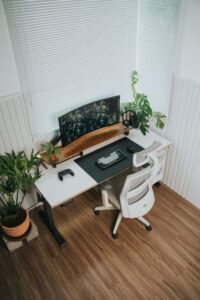
Tips for Creating a Relaxing Home Workspace to Boost Productivity
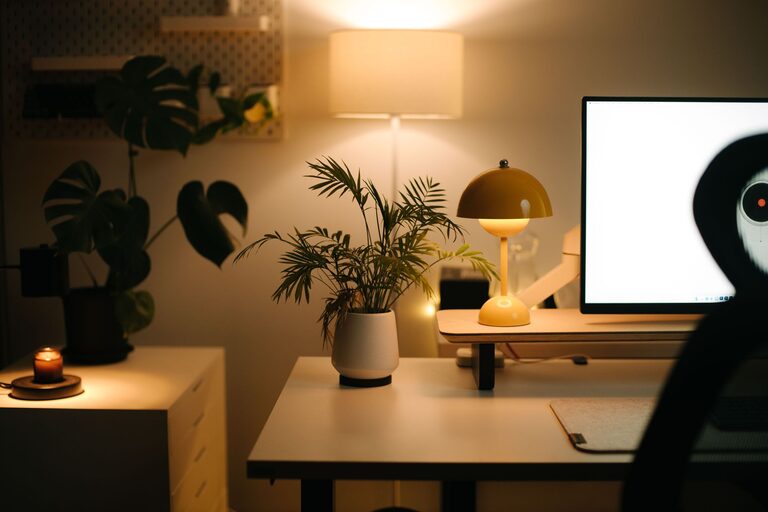
Creating a relaxing home workspace is key to maintaining productivity and reducing stress throughout your workday. Whether you’re working remotely full-time or just occasionally, having a dedicated, calming environment can help improve focus and overall job satisfaction. In this post, we’ll explore actionable tips to design a workspace that feels comfortable, welcoming, and boosts your efficiency.
Why a Relaxing Workspace Matters
Your environment greatly influences your mindset and productivity. A cluttered or uncomfortable space can lead to distraction, fatigue, and reduced motivation. On the other hand, a well-designed, relaxing workspace can:
– Enhance concentration
– Reduce stress and anxiety
– Encourage better posture and comfort
– Promote a consistent work routine
With these benefits in mind, let’s break down the steps to create your ideal home workspace.
Choose the Right Location
Selecting where to set up your workspace is foundational. Here are some key points to consider:
– Natural Light: Position your desk near a window if possible. Natural light boosts mood and helps regulate your body clock. Avoid direct glare on your screen by angling your desk or using sheer curtains.
– Low Traffic Area: Pick a spot that is quiet and less prone to interruptions from family members or pets. This helps maintain focus.
– Separate Space: Using a dedicated area for work helps you mentally separate professional tasks from home life, making it easier to “switch off” after work hours.
Invest in Comfortable and Functional Furniture
Your furniture plays a big role in comfort and productivity. Prioritize:
– Ergonomic Chair: Choose a chair that supports your lower back and allows your feet to rest flat on the floor. Adjustable height and lumbar support are ideal.
– Desk Size: Select a desk that fits your work essentials without being cramped. If space is limited, consider a wall-mounted or foldable desk.
– Monitor Height: Position your computer screen to be at eye level to reduce neck strain. Use a monitor stand if necessary.
Declutter and Organize
Clutter can disrupt your focus. Here are strategies to keep your workspace tidy:
– Use Storage Solutions: Incorporate shelves, drawers, or desktop organizers to keep supplies out of sight but within reach.
– Cable Management: Use clips or sleeves to organize cables and avoid tangled cords.
– Limit Items on Desk: Keep only items that you use daily on your desk to maintain a clean surface.
Personalize Your Space Thoughtfully
Adding personal touches can make your workspace more inviting, but avoid overdecorating which might distract you.
– Plants: Small indoor plants improve air quality and add a calming touch. Succulents or low-maintenance plants are great choices.
– Artwork or Photos: Choose images that inspire or relax you, such as nature scenes.
– Colors: Soft, neutral colors soothe the mind. Consider painted walls or desk accessories in calming shades like blue, green, or beige.
Incorporate Soothing Elements
Creating a calming atmosphere helps reduce stress and improve creativity.
– Lighting: Use soft, warm lighting with desk lamps or LED bulbs. Avoid harsh overhead lights.
– Aromatherapy: Essential oil diffusers or scented candles (used safely) can promote relaxation. Popular scents include lavender, peppermint, and eucalyptus.
– Sound: Background noise can be distracting or helpful. Try white noise machines, soft instrumental music, or nature sounds to improve focus.
Establish a Routine and Break Area
Structure helps maintain productivity and promotes mental well-being.
– Set Work Hours: Designate consistent start and end times for your workday to create boundaries.
– Scheduled Breaks: Take short breaks every hour to stretch, hydrate, or rest your eyes.
– Separate Break Zone: If possible, have a different area in your home for breaks, helping your brain to disconnect from work temporarily.
Keep Technology User-Friendly
Technology should support, not hinder, your workflow.
– Reliable Internet: Ensure strong internet connectivity to prevent interruptions.
– Organized Devices: Use docking stations or stands to keep laptops, tablets, and phones organized.
– Regular Maintenance: Keep your software updated and perform regular device cleanups to avoid slowdowns.
Maintain Healthy Habits
Finally, pay attention to habits that support productivity and well-being at your workspace.
– Posture: Maintain good posture to prevent back and neck pain. Take advantage of ergonomic furniture.
– Hydration and Nutrition: Keep a water bottle at your desk and eat balanced meals to fuel your brain.
– Movement: Incorporate light stretches or short walks to re-energize during breaks.
Final Thoughts
Designing a relaxing home workspace is a personal journey that balances comfort, functionality, and aesthetics. By thoughtfully choosing your location, organizing your space, adding soothing elements, and maintaining healthy routines, you create an environment where productivity naturally flourishes. Take the time to adjust your workspace as needed—small changes can lead to big improvements in work satisfaction and efficiency.
Start with a few tips today, and watch how a mindful workspace transforms your work-from-home experience.